The exact runtime flow
Apple Retention Messaging runs inside Apple's subscription cancellation experience. When a subscriber starts to cancel, Apple can call the realtime URL configured for the app. Your runtime receives a signed request, evaluates the subscription context, and returns one allowed response shape.
The mobile app is not in the request path. That is the main architectural difference from paywalls, winback screens, or in-app subscription UX. Retention Messaging is server-to-server at cancellation time.
The subscriber starts to cancel inside Apple's subscription flow.
Apple sends a signed request body to your configured HTTPS endpoint.
The runtime verifies context, matches a published retention flow, and selects a response.
Apple receives a message, signed promotional offer, alternate product, or fallback path.
Fastest path if you already have App Store Connect products
If your subscriptions already exist in App Store Connect, you can reach live production retention faster than a full greenfield setup. The products, subscription groups, and promotional offers you have already configured count.
App, subscription group, products, and promotional offers exist in App Store Connect. Sync them — no recreation needed.
Request Retention Messaging access, upload messages, run sandbox performance test, configure realtime URL, publish first flow.
The remaining steps are configuration and review — not SDK integration or an app release. Teams with existing App Store subscriptions typically reach sandbox testing within a day of access approval.
The API pieces you actually operate
The Apple API surface is small, but the operational surface is not. Production retention requires access approval, message review, promotional offer configuration, sandbox performance testing, realtime URL publishing, and a runtime that does not call App Store Connect while Apple is waiting for a response.
- Request access. Apple Retention Messaging currently requires an access request before production use.
- Upload messages. Retention Messaging messages are uploaded through Apple's API and enter review before production use.
- Configure promotional offers. App Store promotional offers must exist for the subscription product before a realtime response can reference them.
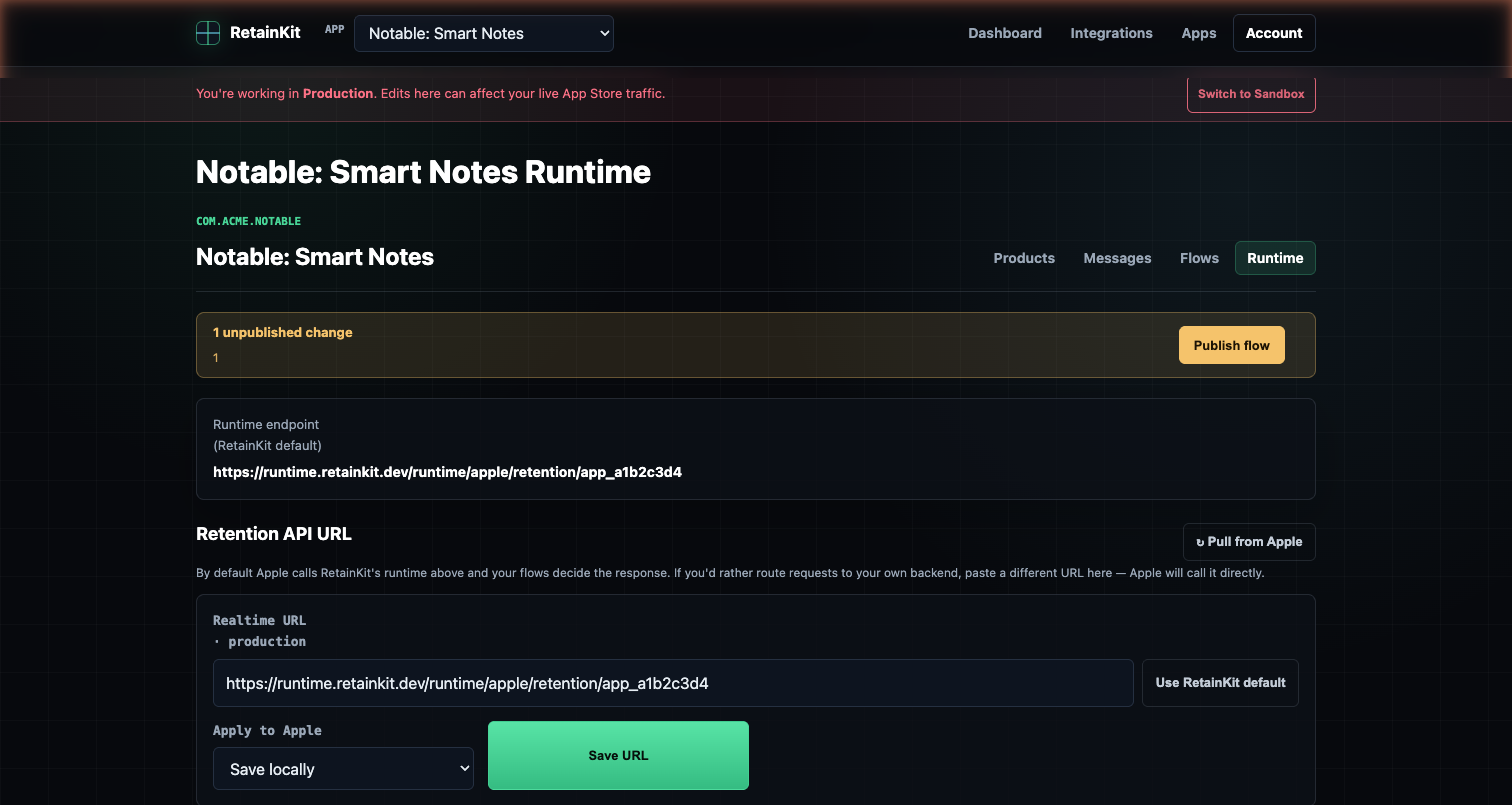
- Configure the realtime URL. Sandbox and production use separate StoreKit API hosts and should point at separate runtime environments.
- Run the sandbox performance test. Apple requires a passing sandbox performance test before configuring production traffic.
- Configure defaults. A default message is your safety path when realtime evaluation fails or no dynamic response is usable.
Access, environments, and ownership
Apple Retention Messaging is not just another endpoint you can call with an existing App Store Connect key. Apple currently requires teams to request access to the Retention Messaging API. That matters operationally because the feature may be unavailable even when the app, subscriptions, and promotional offers already exist.
Once access is granted, treat sandbox and production as separate operating environments. They have different API hosts, different message approval behavior, different transaction identifiers, and often different readiness states. A sandbox message that auto-approves is useful for testing, but it does not imply that production copy is approved. A sandbox performance test PASS is necessary for production URL setup, but it does not approve production messages. A production message that exists in the list endpoint can still be PENDING and unsafe for a published rule.
In a healthy setup, ownership is split cleanly. Engineering owns keys, endpoint configuration, runtime safety, logging, and rollback. Product or growth owns message copy, offer strategy, rollout, and experiment definitions. The control plane should make both sides visible: which Apple objects exist, which are approved, which rules can publish, and which runtime snapshot Apple is currently calling.
Use for URL configuration, message auto-approval, fixture testing, and Apple's performance test.
Use only approved messages, real promotional offers, production URL configuration, and monitored rollout.
Realtime request body
Apple sends a JSON request containing a JWS compact serialization in signedPayload. Your runtime decodes and verifies that payload before making a decision. The decoded body includes the app, environment, product, locale, original transaction identifier, and request identifier.
POST https://runtime.retainkit.dev/apple/retention/{appId}/{environment}
Content-Type: application/json

{
  "signedPayload": "eyJhbGciOiJFUzI1NiIsIng1YyI6WyJ..."
}
After verification, your decision engine should work from decoded fields, not from query strings or client-provided state.
{
  "appAppleId": 1234567890,
  "environment": "PRODUCTION",
  "originalTransactionId": "2000000123456789",
  "productId": "premium.yearly",
  "requestIdentifier": "69b3e1e1-2e47-4b4c-a51f-93b1c28d5e2a",
  "signedDate": 1778912345678,
  "userLocale": "en-US"
}
Two checks matter immediately: make sure appAppleId belongs to your app, and make sure the runtime environment matches the endpoint Apple called. Sandbox transaction identifiers, message states, and offers must not leak into production rules.
Response types: message, promotionalOffer, alternateProduct, fallback
A realtime response uses one response branch at a time. Do not return a message and a promotional offer as siblings. For a promotional-offer response, the message is nested inside the promotional offer object through messageIdentifier.
Text message
Use a plain message when the retention action is copy only. The referenced message must be approved in production.
{
  "message": {
    "messageIdentifier": "7f6f7fd2-8d7d-4f43-8e64-922a53df7a64"
  }
}
Promotional offer
Use promotionalOffer when the cancellation sheet should include an App Store promotional offer. The response contains an approved Retention Messaging message identifier and a promotionalOfferSignatureV2 JWS. The product ID and offer identifier are inside that JWS, not top-level response JSON fields.
{
  "promotionalOffer": {
    "messageIdentifier": "d6db64ea-f018-4ab1-8852-0b33d7c5eeb1",
    "promotionalOfferSignatureV2": "eyJhbGciOiJFUzI1NiIsImtpZCI6IkFCQzEyMyJ9..."
  }
}
Alternate product
Use alternateProduct when you want Apple to offer a different subscription product in the same subscription group. This is useful for downgrade paths, such as yearly to monthly or premium to basic, but the product must be valid for the subscription group.
{
  "alternateProduct": {
    "messageIdentifier": "2d472e8b-62ce-4877-a3bf-d23a67e8c7d3",
    "productId": "premium.monthly",
    "billingPlanType": "PAY_AS_YOU_GO"
  }
}
Fallback
Fallback is an operational design, not a marketing flourish. Configure default messages per product and locale so Apple has a safe approved message if the realtime URL is unavailable, slow, or unable to produce a valid response. In RetainKit, publish validation prevents rules from referencing pending messages, missing offers, or environment-mismatched products.
Control plane vs runtime
The most important architectural decision is separating configuration management from realtime evaluation. Apple gives you APIs. It does not give you a safe operational workflow. Without that separation, teams tend to build a runtime that reads environment variables, calls App Store Connect during cancellation, and relies on tribal knowledge about which message IDs are safe.
The control plane is allowed to be slower because it runs before publish. It can sync App Store Connect, list messages, inspect promotional offers, validate locale coverage, compare pending changes, and show operators a diff. The runtime is not allowed to be slow. It should receive Apple's signed payload, verify it, evaluate a local snapshot, optionally sign a promotional offer, and return a compact response.
Control plane
  -> App Store Connect sync
  -> message and offer inventory
  -> validation and preview
  -> publish immutable snapshot

Runtime
  -> verify Apple signedPayload
  -> evaluate snapshot
  -> sign promotional offer if needed
  -> return realtime response
This is also where rollback becomes practical. If a new retention flow references the wrong storefront or underperforms in an experiment, the answer should be to republish the previous runtime snapshot. It should not require reverting application code, redeploying a backend service, or editing a production environment variable during an incident.
For experiments, keep assignment deterministic. A user who triggers cancellation twice in a short window should not bounce between unrelated retention variants because a random number generator happened to run again. Use a stable assignment key derived from request context, and store only what you need for measurement. Raw transaction identifiers should be encrypted or hashed depending on whether you need to use them later for outcome polling.
Logs, simulation, and what to inspect
A Retention Messaging runtime without logs is difficult to trust. Apple will call the endpoint during a high-intent cancellation moment, and the user experience will not include your debugging UI. You need enough structured data to answer what happened without storing sensitive identifiers in plaintext.
At minimum, log the request identifier, environment, app, product ID, locale, selected rule, selected response type, selected message identifier, selected promotional offer identifier, fallback reason, runtime snapshot ID, and latency. Avoid logging the raw original transaction identifier. If you need to correlate outcomes later, store it encrypted and use a hashed value for routine logs.
{
  "requestIdentifier": "69b3e1e1-2e47-4b4c-a51f-93b1c28d5e2a",
  "environment": "PRODUCTION",
  "productId": "premium.yearly",
  "locale": "en-US",
  "snapshot": "rk_snap_2026_05_16_01",
  "rule": "yearly_winback",
  "responseType": "promotionalOffer",
  "messageIdentifier": "d6db64ea-f018-4ab1-8852-0b33d7c5eeb1",
  "offerIdentifier": "SAVE50",
  "fallbackReason": null,
  "latencyMs": 84
}
Simulation should use the same published snapshot format as production. A simulator that bypasses validation or calls a different rule engine can make the dashboard feel comforting while failing to test the real path. The useful simulator answers specific questions: if Apple sends this product, locale, transaction state, and environment, which rule wins, which message is returned, which offer is signed, and what would the fallback be?
For production readiness, run three classes of tests. First, static validation before publish: missing messages, pending messages, invalid priorities, unreachable rules, and missing locale defaults. Second, sandbox performance testing through Apple's API. Third, synthetic runtime checks against your own simulator and health endpoints. Each test catches a different category of failure.
Production readiness checklist
Before production traffic, verify the full chain. The useful checklist is endpoint-first because Apple's production URL will not help you if the runtime still depends on mutable App Store Connect reads.
| Area | Production check | Endpoint or artifact |
|---|---|---|
| Access | Apple has granted Retention Messaging API access for the developer account. | Apple access request |
| Messages | Production message state is APPROVED, including image state when an image is used. | GET /inApps/v1/messaging/message/list |
| Defaults | Each product and locale has an approved default message for fallback. | PUT /inApps/v1/messaging/default/{productId}/{locale} |
| Sandbox URL | Sandbox URL is configured and points to the sandbox runtime. | PUT https://api.storekit-sandbox.apple.com/inApps/v1/messaging/realtime/url |
| Performance | Sandbox performance test passes with acceptable response times. | POST /inApps/v1/messaging/performanceTest |
| Production URL | Production URL points to a globally reachable runtime snapshot. | PUT https://api.storekit.apple.com/inApps/v1/messaging/realtime/url |
| Runtime | Evaluation uses immutable config snapshots and does not call App Store Connect during cancellation. | runtime.retainkit.dev/apple/retention/{appId}/{environment} |
RetainKit pattern: use App Store Connect APIs for sync and validation before publish, then compile retention flows into immutable runtime snapshots distributed to Cloudflare Workers and KV.
Common implementation mistakes
- Calling App Store Connect at request time. App Store Connect belongs in the control plane. The realtime path should evaluate local config and sign offers quickly.
- Mixing sandbox and production state. Sandbox messages and offers do not prove production messages are approved.
- Referencing PENDING messages. A message can exist in production and still be unusable for realtime responses until Apple approves it.
- Putting offer fields in the wrong place. For
promotionalOfferSignatureV2,productIdandofferIdentifierare claims inside the signed JWS. - Using a generic App Store Connect API key for signing. Promotional-offer signing uses a StoreKit/In-App Purchase key.
- Not configuring defaults. Default messages are how you avoid an empty cancellation experience when a dynamic path fails.
- Assuming no app release means no setup. No SDK integration is possible, but you still need Apple access, keys, messages, offers, URL configuration, sandbox testing, and runtime publishing.
- Letting the dashboard and runtime disagree. Preview, simulator, validation, and runtime evaluation should all use the same compiled rule representation.
- Skipping approval-state visibility. Operators need to see pending messages, but production publish needs to block them.
- Ignoring locales until launch day. Locale gaps are easier to fix before messages enter review and before defaults are configured.
The theme behind most failures is simple: teams treat Retention Messaging like a one-off integration instead of an operational system. The API itself is capable, but production reliability comes from the workflow around it: review state, validation, publish, rollback, observability, and a runtime that does as little as possible while Apple is waiting.