Exact upload, list, and default endpoints
Apple uses the same paths for sandbox and production, with different StoreKit hosts. Upload and list in the same environment you plan to publish.
| Operation | Path | Notes |
|---|---|---|
| Upload message | PUT /inApps/v1/messaging/message/{messageIdentifier} | Creates a Retention Messaging message. The identifier is a UUID you provide. |
| List messages | GET /inApps/v1/messaging/message/list | Returns uploaded message identifiers and messageState. |
| Upload image | PUT /inApps/v1/messaging/image/{imageIdentifier} | PNG only. Images have their own review state. |
| List images | GET /inApps/v1/messaging/image/list | Use when a text message includes an image. |
| Configure default | PUT /inApps/v1/messaging/default/{productId}/{locale} | Sets the approved fallback message for a product and locale. |
PUT https://api.storekit.apple.com/inApps/v1/messaging/message/{messageIdentifier}
PUT https://api.storekit-sandbox.apple.com/inApps/v1/messaging/message/{messageIdentifier}
Message body and content constraints
A message can contain localized text and, for text-based messages, an optional image. Promotional-offer and alternate-product messages should not include images. Keep content short enough for Apple's cancellation sheet and for Apple's API limits.
- Header text is limited to 66 characters.
- Body text is limited to 144 characters.
- Alt text is limited to 150 characters.
- Bullet point text is limited to 66 characters.
- Apple allows up to 2,000 messages per app.
{
  "locale": "en-US",
  "header": "Stay with Premium",
  "body": "Keep your yearly plan and save 50% for the next renewal.",
  "messageType": "PROMOTIONAL_OFFER"
}
Use BCP 47-style locale values such as en-US. A common gotcha is sending en_US, which looks familiar to engineers but is not the format Apple expects for these APIs.
Message identifier strategy
The upload endpoint is not idempotent. If you reuse a message identifier that already exists, Apple returns a conflict. Treat message identifiers as immutable content records.
A good operational pattern is deterministic UUID generation from stable content dimensions, then a new UUID when meaningfully changing the message:
uuid_v5(
  namespace = retainkit_message_namespace,
  name = "{bundleId}:{environment}:{productId}:{locale}:{purpose}:{contentVersion}"
)
User-provided IDs are workable for small teams, but they tend to drift. Deterministic UUIDs make sync, diffing, review state, and rollback easier because the control plane can map content to Apple state without guessing.
Sandbox auto-approval vs production review
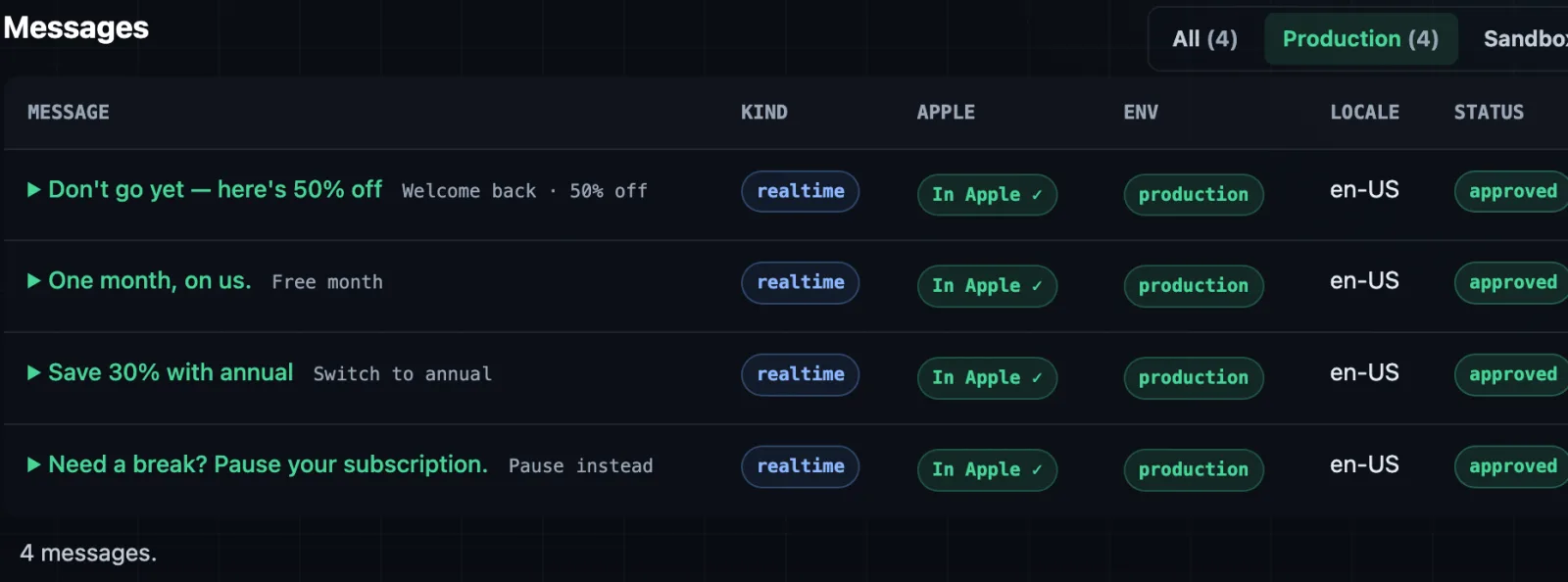
Sandbox behaves differently from production. Apple automatically approves sandbox messages and images so you can test the runtime path. Production messages start as PENDING and become usable only after Apple approves them.
Messages and images are auto-approved for testing. This does not approve production content.
Messages and images enter review. Runtime rules should not reference them while they are pending.
Default messages are production infrastructure
Default messages are the fallback path. Configure an approved default message for each product and locale where Retention Messaging is enabled. If the realtime URL fails, times out, or returns no usable dynamic response, the default message protects the cancellation experience from becoming empty.
PUT https://api.storekit.apple.com/inApps/v1/messaging/default/premium.yearly/en-US
Authorization: Bearer {app_store_connect_jwt}
Content-Type: application/json

{
  "messageIdentifier": "7f6f7fd2-8d7d-4f43-8e64-922a53df7a64"
}
Default messages must be approved. If the message contains an image, the image also needs to be approved.
Do not publish rules referencing PENDING messages
This is the core operational rule. A production flow can know about pending messages, display them in an inventory table, and show their review state, but it should not allow those messages into a published runtime snapshot.
- Block production publish when a referenced message is
PENDING. - Block production publish when a referenced image is
PENDING. - Validate that promotional-offer and alternate-product messages do not include images.
- Validate locale coverage before enabling storefront-specific rules.
- Keep pending content visible in the dashboard so teams understand what Apple is still reviewing.
Sources
- Apple Upload Message documentation
- Apple Get Message List documentation
- Apple Configure Default Message documentation
- Apple Upload Image documentation
Set up retention messaging while you wait for Apple. RetainKit hosts the endpoint, signs the offers, and measures what you saved — no SDK, no app release. Try the live demo: no signup or Apple key required.