What PENDING means
Expected timeline: Apple does not publish an SLA for production Retention Messaging message review. Plan for days, not hours. Do not block launch on a message that was just uploaded.
After you upload a production Retention Messaging message, Apple sets the message state to PENDING. Apple reviews the content before it can be used in production. If the message includes an image, the image has its own review state and also needs approval.
Treat pending as a real operational state, not a transient UI glitch. Your control plane should show pending inventory, but production runtime snapshots should reference only approved content.
Sandbox approval does not approve production
Sandbox is designed for setup and performance testing. Apple auto-approves sandbox messages and images so you can validate request handling. That does not mean the corresponding production message is approved.
- Sandbox message approved: useful for testing.
- Sandbox performance test
PASS: required before production URL configuration. - Production message
PENDING: still not safe to publish in production rules.
The sandbox benchmark proves the callback can respond. It does not approve production message content.
What to write so you don't get rejected
The slowest review is the one you do twice: a rejection restarts the clock. Most retention-message rejections are avoidable, because the constraints are the same ones Apple applies elsewhere — the content is rendered inside Apple's own cancellation sheet, so Apple holds it to Apple's standards, not your marketing site's.
- State the offer plainly and completely. "50% off for 3 months, then $9.99/month" reviews better than "a special deal just for you". If the message references a promotional offer, the copy must match the offer's actual terms — price, duration, and what happens after.
- No pressure tactics. Countdown language ("last chance", "expires today"), guilt framing, or anything that makes cancelling feel penalized works against you. The subscriber is mid-cancellation; Apple protects that flow.
- Skip superlatives and formatting tricks. ALL CAPS, stacked exclamation marks, emoji walls, and "world's best" claims are the fastest route to a second review cycle.
- Localize properly or not at all. A machine-translated string that misstates the offer in another locale is a rejection in that locale. Each locale is reviewed as content, not decoration.
- Follow the image rules exactly. Images have their own review state and their own rejection path. Meet the dimension and format requirements, and keep the image illustrative — not a screenshot stuffed with additional offer text that can drift out of sync with the message.
- Write the default message first. The default (non-realtime) message is what Apple shows when your server doesn't answer. Make it your safest, most general copy, and keep the aggressive variants in realtime flows where you can target and roll them back.
Why a tool may say "no messages yet"
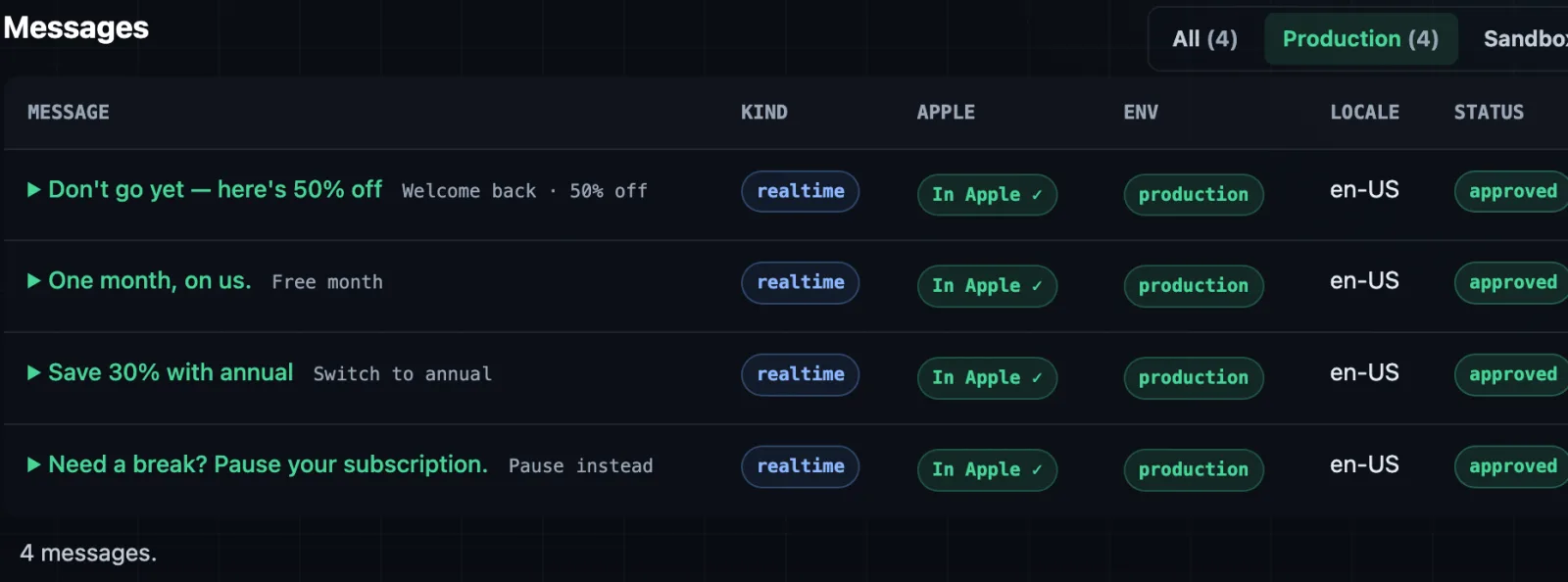
If you know production messages exist but a tool shows no selectable messages, check whether the tool is showing all uploaded inventory or only production-usable messages. A conservative control plane may hide pending messages from flow builders so nobody accidentally publishes a runtime rule that Apple cannot render.
Should show uploaded messages, including PENDING, APPROVED, and rejected states where available.
Should usually show only approved messages that can be used by the selected response type.
Also confirm the environment. A production message will not appear in a sandbox-only picker, and sandbox auto-approved messages should not appear in a production publish path.
Diagnosis checklist
- Call
GET /inApps/v1/messaging/message/listagainst the production StoreKit host. - Confirm the exact
messageIdentifierexists in the production response. - Check
messageState. If it isPENDING, do not publish a production rule that references it. - If the message uses an image, check the image list and image state too.
- Confirm the app, bundle ID, subscription group, product ID, and locale match the flow you are editing.
- Refresh App Store Connect sync in your control plane.
- Check whether the flow builder filters to approved messages by design.
GET https://api.storekit.apple.com/inApps/v1/messaging/message/list
Authorization: Bearer {in_app_purchase_key_jwt}
When to contact Apple
Contact Apple if production messages remain pending longer than your launch schedule can tolerate, if the API state disagrees with App Store Connect, or if messages appear stuck after you have verified environment and image state.
Include concrete identifiers so support can inspect the right objects:
- Developer account and team ID.
- Bundle ID and Apple app ID.
- Message identifiers and image identifiers.
- Current production
messageStatevalues from the message list endpoint. - Sandbox performance test request ID and
PASSresult. - Sandbox and production realtime URLs.
- Approximate upload time and timezone.
Frequently asked questions
How long does Apple review retention messages?
Apple publishes no SLA. Plan for days, not hours — and remember a rejection restarts the clock, so submit early and start from plain, factual copy.
Does sandbox approval carry over to production?
No. Sandbox messages and images are auto-approved so you can test the callback path. The production copies are reviewed separately and start as PENDING.
Do I need a new app release when a message is approved?
No. Retention Messaging is server-to-server; going live after approval is a configuration change, not a deploy.
Can I use a PENDING message in a production flow?
No — Apple can't render unapproved content, so the rule would fail at cancellation time. That's why careful tools hide pending messages from production publish controls.
Sources
- Apple Upload Message documentation
- Apple Get Message List documentation
- Apple Upload Image documentation
Set up retention messaging while you wait for Apple. RetainKit hosts the endpoint, signs the offers, tracks review states per locale, and emails you the moment Apple approves. Try the live demo: no signup or Apple key required.